Overtime Meal Auto-Submit
Paste Slack message or fill form → Extension auto-submits to Groupware
Please sign in with Google to get started
Loading...
Approver:
Slack Message
Request History
Loading...
Team Members
| Name | Groupware ID |
|---|
1. My Info
Auto-registered on Google sign-in. Edit only if your Slack name differs.
2. Install Extension
Download Extension (ZIP)- Click the button above to download the ZIP file
- Unzip the downloaded file
- Open
chrome://extensionsin Chrome (click to copy) - Enable Developer mode (top right)
- Click Load unpacked and select the unzipped folder
- Done! Refresh this page to auto-configure the extension
Waiting for extension...
3. How It Works
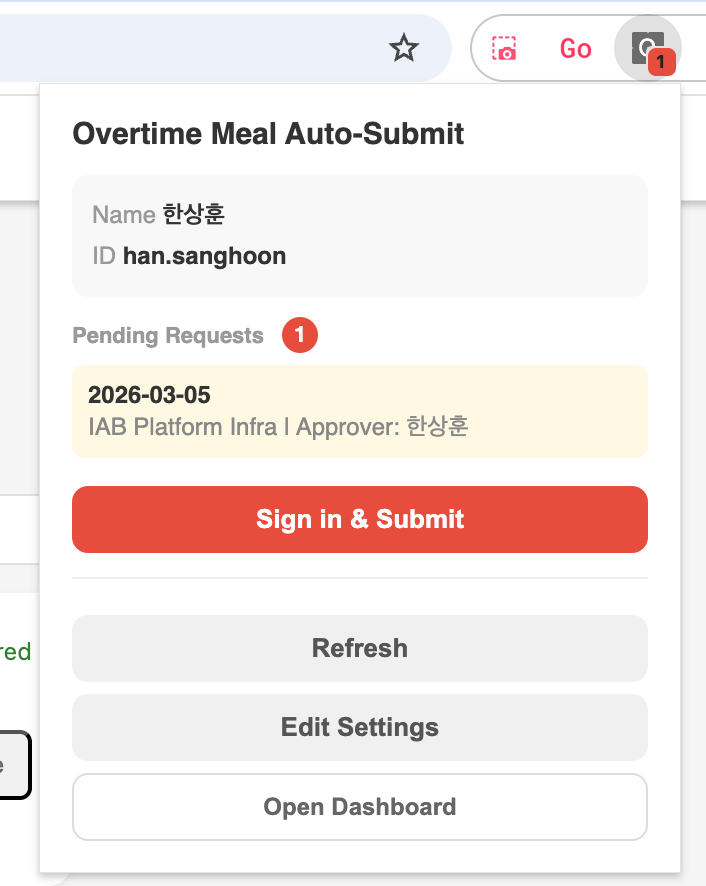
- When a request is registered (via form or Slack message), you get a Chrome notification automatically
- Click the extension icon to see how many pending requests you have
- Click "Sign in & Submit" to open the Groupware login page
- After login, the extension auto-submits all pending requests at once and closes
Even if requests from multiple dates are queued, they are all processed in one go. Only your own pending requests are submitted.
Department Presets
| Department | Cost Center | Approver |
|---|
Slack Crawling
Schedule: Every hour (Cloud Scheduler)
Last crawl: Loading...
Last crawl: Loading...